SQL Formatter
Free online SQL formatter with real-time preview. Format SQL for MySQL, PostgreSQL, SQL Server instantly. No signup, no ads, 100% private. Try now!
SQL Formatter Preview
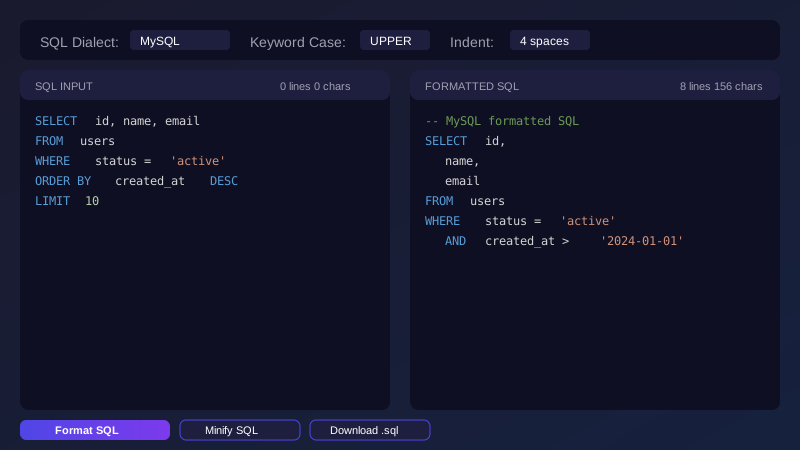
Format SQL queries instantly with our free online tool. Supports MySQL, PostgreSQL, SQL Server, Oracle, and SQLite.
Why Use Our SQL Formatter?
Multi-Dialect Support
Format SQL for MySQL, PostgreSQL, SQL Server, Oracle, and SQLite. Each dialect has its own specific functions and syntax that our formatter recognizes and handles correctly.
Real-Time Preview
See formatted results instantly as you type. No waiting for server responses - all processing happens in your browser for immediate feedback.
Customizable Formatting
Control keyword case (UPPER, lower, or preserve), indentation size (2/4 spaces or tab), and maximum line length. Format SQL exactly the way your team prefers.
SQL Minification
Compress your SQL queries by removing unnecessary whitespace. Perfect for embedding SQL in code or reducing query size for network transmission.
100% Private & Secure
All formatting happens in your browser. Your SQL queries are never sent to any server, never stored, and never logged. Safe to use with sensitive database queries and proprietary code.
No Limits & No Signup
No file size limits, no registration required, no usage restrictions. Format unlimited SQL queries of any size completely free.
Line Numbers & Statistics
Track line numbers for easy debugging and see real-time statistics including line count and character count for both input and output.
Offline Capable
Works without internet connection once loaded. Perfect for developers working in secure environments or on the go.
How to Use SQL Formatter
Step 1: Paste Your SQL
Copy your SQL query and paste it into the input panel. You can also click the upload button to load a .sql file from your computer. Supports queries of any size and complexity.
Step 2: Select SQL Dialect
Choose your database type from the dropdown: MySQL, PostgreSQL, SQL Server, Oracle, or SQLite. This ensures proper formatting for dialect-specific functions and syntax.
Step 3: Adjust Formatting Options
Set keyword case preference (UPPER is standard for readability), indentation size (2 or 4 spaces, or tab), and maximum line length to match your team's coding style.
Step 4: Format or Minify
Click "Format SQL" to beautify your query with proper indentation and line breaks, or "Minify SQL" to compress it into a single line for embedding in code.
Step 5: Copy or Download
Use the copy button to copy the formatted SQL to your clipboard instantly, or download it as a .sql file for later use. Both options work with queries of any size.
SQL Formatting Examples
Simple SELECT Query
Before Formatting:
select id,name,email from users where status='active' and created_at>'2024-01-01' order by name asc limit 10After Formatting:
SELECT
    id,
    name,
    email
FROM
    users
WHERE
    status = 'active'
    AND created_at > '2024-01-01'
ORDER BY
    name ASC
LIMIT 10
Complex JOIN Query
Before Formatting:
select u.id,u.name,count(o.id) as order_count,sum(o.total) as total_spent from users u left join orders o on u.id=o.user_id where u.status='active' and o.created_at>='2024-01-01' group by u.id,u.name having count(o.id)>0 order by total_spent desc limit 100After Formatting:
SELECT
    u.id,
    u.name,
    COUNT(o.id) AS order_count,
    SUM(o.total) AS total_spent
FROM
    users u
LEFT JOIN
    orders o ON u.id = o.user_id
WHERE
    u.status = 'active'
    AND o.created_at >= '2024-01-01'
GROUP BY
    u.id,
    u.name
HAVING
    COUNT(o.id) > 0
ORDER BY
    total_spent DESC
LIMIT 100
CTE (Common Table Expression)
Before Formatting:
with monthly_sales as (select date_trunc('month',order_date) as month,sum(total) as revenue from orders where order_date>='2024-01-01' group by date_trunc('month',order_date)),ranked_months as (select month,revenue,rank() over(order by revenue desc) as rank from monthly_sales) select * from ranked_months where rank<=10After Formatting:
WITH monthly_sales AS (
    SELECT
        DATE_TRUNC('month', order_date) AS month,
        SUM(total) AS revenue
    FROM orders
    WHERE order_date >= '2024-01-01'
    GROUP BY DATE_TRUNC('month', order_date)
),
ranked_months AS (
    SELECT
        month,
        revenue,
        RANK() OVER (ORDER BY revenue DESC) AS rank
    FROM monthly_sales
)
SELECT * FROM ranked_months WHERE rank <= 10
INSERT Statement
Before Formatting:
insert into users(name,email,status,created_at)values('John Doe','john@example.com','active',now()),('Jane Smith','jane@example.com','active',now()),('Bob Wilson','bob@example.com','inactive',now())After Formatting:
INSERT INTO users (name, email, status, created_at)
VALUES
    ('John Doe', 'john@example.com', 'active', NOW()),
    ('Jane Smith', 'jane@example.com', 'active', NOW()),
    ('Bob Wilson', 'bob@example.com', 'inactive', NOW())
UPDATE Statement
Before Formatting:
update users set name='Updated Name',email='updated@example.com',status='inactive',updated_at=now() where id=123 and status='active'After Formatting:
UPDATE users
SET
    name = 'Updated Name',
    email = 'updated@example.com',
    status = 'inactive',
    updated_at = NOW()
WHERE
    id = 123
    AND status = 'active'
SQL Dialect Comparison
Different SQL databases have varying syntax and functions. Here's a quick comparison of common differences:
| Feature | MySQL | PostgreSQL | SQL Server | Oracle | SQLite |
|---|---|---|---|---|---|
| String Concatenation | CONCAT(a, b) |
a || b |
a + b |
a || b |
a || b |
| Limit Results | LIMIT n |
LIMIT n |
TOP n |
ROWNUM <= n |
LIMIT n |
| Auto Increment | AUTO_INCREMENT |
SERIAL |
IDENTITY |
SEQUENCE |
AUTOINCREMENT |
| Boolean Type | TINYINT(1) |
BOOLEAN |
BIT |
NUMBER(1) |
INTEGER |
| Current Timestamp | NOW() |
NOW() |
GETDATE() |
SYSDATE |
datetime('now') |
| IF NULL | IFNULL(x, y) |
COALESCE(x, y) |
ISNULL(x, y) |
NVL(x, y) |
IFNULL(x, y) |
| JSON Support | ✓ (5.7+) | ✓ (9.3+) | ✓ (2016+) | ✓ (12c+) | ✓ (3.38+) |
| Full-Text Search | ✓ Built-in | ✓ Built-in | ✓ Built-in | ✓ Built-in | ✓ FTS5 |
Complete SQL Keywords Reference
| Category | Keywords |
|---|---|
| Data Query | SELECT, FROM, WHERE, JOIN, INNER JOIN, LEFT JOIN, RIGHT JOIN, FULL JOIN, CROSS JOIN, ON, GROUP BY, HAVING, ORDER BY, LIMIT, OFFSET, TOP, DISTINCT, UNION, INTERSECT, EXCEPT |
| Data Manipulation | INSERT, INTO, VALUES, UPDATE, SET, DELETE, MERGE, REPLACE |
| Data Definition | CREATE, ALTER, DROP, TABLE, INDEX, VIEW, DATABASE, SCHEMA, SEQUENCE, TRIGGER, PROCEDURE, FUNCTION |
| Data Types | INT, INTEGER, BIGINT, SMALLINT, TINYINT, VARCHAR, CHAR, TEXT, BOOLEAN, BOOL, DATE, DATETIME, TIMESTAMP, TIME, DECIMAL, NUMERIC, FLOAT, DOUBLE, REAL, BLOB, CLOB, JSON, UUID |
| Constraints | PRIMARY KEY, FOREIGN KEY, UNIQUE, NOT NULL, DEFAULT, CHECK, REFERENCES, CONSTRAINT |
| Logical Operators | AND, OR, NOT, IN, BETWEEN, LIKE, IS NULL, IS NOT NULL, EXISTS, ANY, ALL, SOME |
| Aggregate Functions | COUNT, SUM, AVG, MIN, MAX, GROUP_CONCAT, STRING_AGG, ARRAY_AGG |
| String Functions | CONCAT, SUBSTRING, LENGTH, UPPER, LOWER, TRIM, LTRIM, RTRIM, REPLACE, LEFT, RIGHT, LPAD, RPAD, INSTR, POSITION |
| Date Functions | NOW, CURRENT_DATE, CURRENT_TIME, CURRENT_TIMESTAMP, DATE_ADD, DATE_SUB, DATEDIFF, EXTRACT, DATE_TRUNC, TO_DATE, TO_CHAR |
| Window Functions | ROW_NUMBER, RANK, DENSE_RANK, NTILE, LAG, LEAD, FIRST_VALUE, LAST_VALUE, OVER, PARTITION BY, ROWS, RANGE |
| CTE & Subquery | WITH, RECURSIVE, AS, LATERAL |
| Conditional | CASE, WHEN, THEN, ELSE, END, IF, IIF, DECODE, COALESCE, NULLIF, NVL, IFNULL |
| Transactions | BEGIN, START TRANSACTION, COMMIT, ROLLBACK, SAVEPOINT, SET TRANSACTION |
| Access Control | GRANT, REVOKE, PRIVILEGES, ROLE, USER |
| Other | CAST, CONVERT, COLLATE, NULL, DEFAULT, AUTO_INCREMENT, IDENTITY, SERIAL, COMMENT, ENGINE, CHARSET |
Frequently Asked Questions
SQL formatting (also called SQL beautification) is the process of organizing SQL code with proper indentation, line breaks, and spacing to make it more readable. Well-formatted SQL is easier to understand, debug, and maintain. It helps teams maintain consistent code style and reduces errors during code review.
Using uppercase for SQL keywords is a widely adopted convention that improves readability. It helps distinguish keywords from table names, column names, and values. Most SQL style guides recommend uppercase keywords for consistency. This convention makes SQL queries easier to scan and understand at a glance.
Our SQL formatter supports the most popular database systems:
- MySQL - Most popular open-source database for web applications
- PostgreSQL - Advanced open-source database with rich features
- SQL Server - Microsoft's enterprise database solution
- Oracle - Enterprise-grade database for large organizations
- SQLite - Lightweight embedded database for mobile and desktop apps
SQL minification removes unnecessary whitespace, line breaks, and indentation from SQL queries. This reduces query size, which is useful for:
- Embedding SQL in application code or configuration files
- Reducing network transmission size for API calls
- Storing queries in limited space environments
- Obfuscating SQL for basic code protection
No! All formatting happens entirely in your browser using JavaScript. Your SQL queries are never sent to any server, never stored, and never logged. This makes it safe to use with sensitive database queries, proprietary code, and confidential business logic. Your data stays on your computer.
Yes! There's no file size limit. All processing happens in your browser, so you can format SQL files of any size. For very large files (thousands of lines), performance depends on your browser and device capabilities. We've tested with files containing over 100,000 lines successfully.
The formatter performs basic syntax validation and will show errors for common issues like unmatched parentheses, missing quotes, or invalid characters. However, it doesn't validate against database-specific rules or check if tables/columns exist. For full validation, you should test your queries against your actual database.
Most SQL style guides recommend:
- 4 spaces - Most common, provides clear visual hierarchy, recommended for most teams
- 2 spaces - Popular in web development, saves horizontal space for deeply nested queries
- Tab - Allows developers to set their preferred width in their editor
Consistency within a project is more important than the specific choice. Pick one style and stick with it.
Yes! Once the page is loaded, all formatting happens in your browser. You can continue using the tool offline. Just keep the tab open and format SQL queries without an internet connection. This is perfect for developers working in secure environments or while traveling.
Yes, completely free! No registration, no usage limits, no hidden fees, no ads. Use it as much as you want for any purpose - personal, educational, or commercial. We believe developers deserve quality tools without barriers.
Simply paste your entire stored procedure code into the input panel. The formatter will handle CREATE PROCEDURE statements, variable declarations, control flow (IF/ELSE, WHILE), and the procedure body. Select the appropriate SQL dialect for best results, as stored procedure syntax varies between databases.
The formatter recognizes and preserves all standard SQL comment formats:
- Single-line comments:
-- This is a comment - Multi-line comments:
/* This is a comment */ - MySQL-style:
# This is a comment
Comments are preserved during formatting and minification removes them to reduce size.
Yes! The formatter fully supports Unicode characters including Chinese, Japanese, Korean, Arabic, and any other language. You can format SQL queries with Chinese table names, column names, string values, and comments without any issues.
For very long SQL queries:
- Use the "Max Line" option to set a line length limit (80 or 120 characters)
- Upload your SQL file instead of pasting for better performance
- Consider breaking complex queries into CTEs (Common Table Expressions) for better readability
- Use the minify option if you need to embed the query in code
Yes! The formatter recognizes and properly formats window functions including ROW_NUMBER(), RANK(), DENSE_RANK(), LAG(), LEAD(), and aggregate functions with OVER() clauses. The PARTITION BY and ORDER BY clauses within window functions are also formatted correctly.
Yes! You can paste multiple SQL statements separated by semicolons and format them all at once. Each statement will be formatted independently while maintaining the semicolon separators. This is perfect for formatting SQL scripts, migration files, or database dumps.
There's no hard limit imposed by the tool. The practical limit depends on your browser and device memory. We've successfully tested with SQL files over 10MB (hundreds of thousands of lines). For extremely large files, performance may vary based on your hardware.
Yes! When formatting, all comments are preserved in their original positions. The formatter recognizes single-line comments (--), multi-line comments (/* */), and MySQL-style comments (#). Note that the minify option removes comments to reduce query size.
Yes! You can choose from three keyword case options:
- UPPER - Converts all keywords to uppercase (SELECT, FROM, WHERE) - most common convention
- lower - Converts all keywords to lowercase (select, from, where) - some teams prefer this
- Preserve - Keeps original casing as you typed it
The formatter works in real-time as you type, so there's no need for a format shortcut. Your SQL is automatically formatted with the current settings. For minification, you can click the "Minify SQL" button or press Tab to navigate to it and press Enter.
Yes! The formatter works with all modern browsers including Chrome, Firefox, Safari, Edge, and Opera. It also works on mobile browsers for iOS and Android. For best performance, we recommend using the latest version of your preferred browser.
References & Resources
About SQL Formatter
Free online SQL formatter with real-time preview. Format SQL for MySQL, PostgreSQL, SQL Server instantly. No signup, no ads, 100% private. Try now!